 Indie Hackers
 PeerPush
 Swadeshi Apps
 DEV
 Medium
 Quora
 MacPip
 MacNative
 YouTube
 Instagram
 Reddit
Checked on your Mac
Every check happens on your Mac, in the moment. Camera images never leave your Mac.
Catch the stress you don't notice.
Poxture App checks how you sit through your Mac's camera. Camera images never leave your Mac.
No image, no account, no subscription, works without internet · Free to use: an hour a day forever, and every feature for your first 14 days · Apple Silicon Mac, macOS 15 or later
Poxture App is a Mac app. Open poxture.com on your Mac to download.
Download the Mac app anyway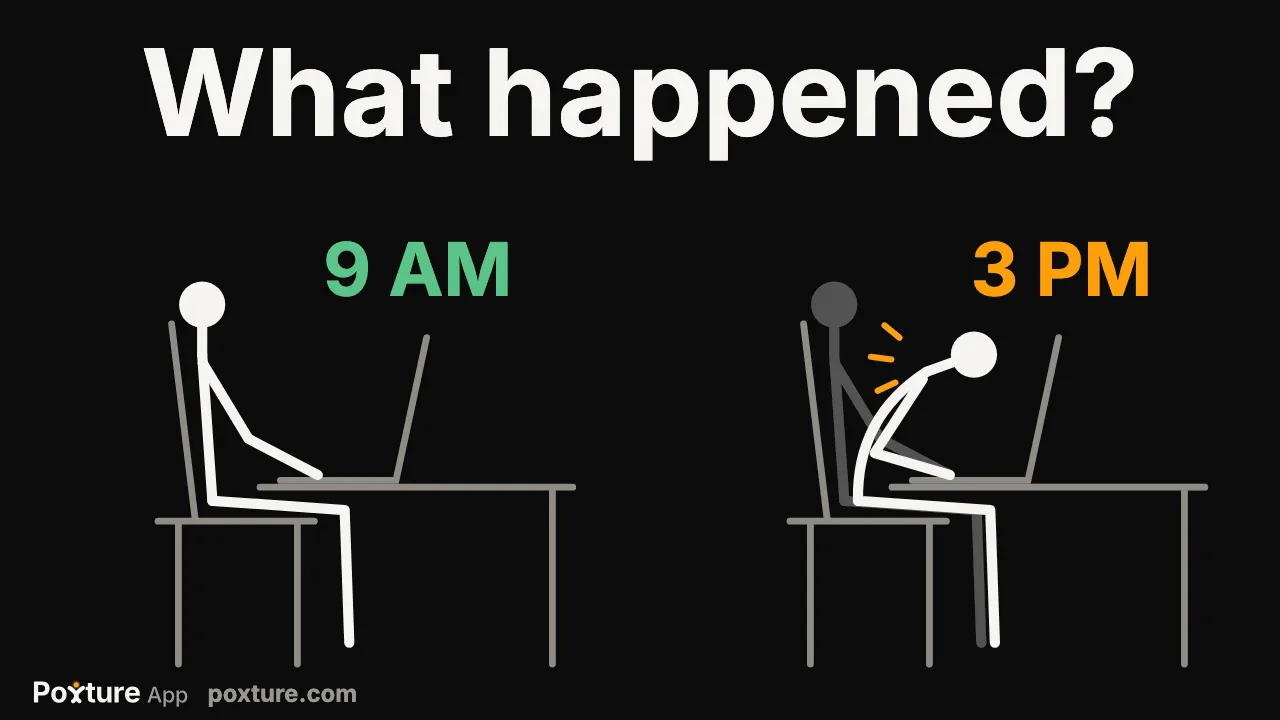
These are the bad postures that strain your neck, shoulders and back. Poxture App checks for all eight and reminds you while they're happening.
Your face creeps toward the display while you read, write or code. A soft glow tells you, and the card shows how to sit back. Over a day this loads your neck and upper back.
Why your face creeps toward the screen ›A hard problem pulls you in until your back rounds and your shoulders curl forward. Poxture App knows how you sit when you sit well, so it notices and reminds you to sit back. Hunching loads your upper back and neck.
How to stop hunching ›Looking down at a laptop all day is the habit people call tech neck. A glance at your keyboard doesn't count; staying there does. It strains your neck and the top of your upper back.
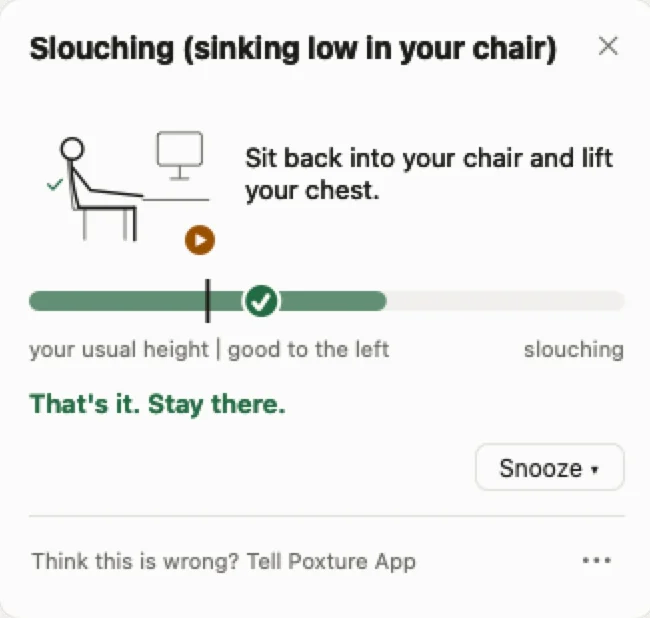
Tech neck from the computer ›Late in the day you sink lower in your chair, a little at a time. Poxture App checks for this and tells you when you've sunk below your own good posture. Slouching loads your lower back and makes your neck work to hold your head up.
Why you slouch without noticing ›You prop an elbow on one armrest and sink onto one hip, and stay there through a long read. Poxture App checks for the tilt and reminds you to sit evenly. Leaning to one side loads one side of your lower back and neck.
Why you lean to one side ›Chin on your palm or your jaw in your hand, the pose you slip into when you're thinking hard. You find out while it's happening. Resting your head on a hand strains your neck and one shoulder.
Resting your chin on your hand ›Deep in work, 40 minutes go by without a single change of position. Even a good posture gets stiff when it never changes, and your neck, shoulders and lower back feel it first.
What sitting still too long does ›You take the laptop to the sofa for a quick look, and an hour goes by. Poxture App doesn't judge how you sit there; it reminds you to get up every 10 minutes by default. Hours in one soft spot leave your neck and lower back stiff.
Laptop on the sofa, or a monitor in the wrong place? See 12 more posture tips ›
Poxture App reads each camera image on your Mac the moment it arrives, then drops it. No camera image or video is ever sent anywhere.
Every check happens on your Mac, in the moment. Camera images never leave your Mac.
Your Mac turns each image into a few points: where your head, shoulders and hands are. The image is dropped at once, and Poxture App judges only those points against the good posture you showed it. No picture or video of you is ever saved.
Leave it running all day next to your builds, calls and tabs. You won't feel it's there.
Worry:“A camera on me all day.”
What happens:The camera is off whenever Poxture App isn't checking your posture: when you pause, outside your work hours, while another app uses the mic or camera if you choose, and when the Mac is locked.
Worry:“It's recording me.”
What happens:It isn't. Each image is read the moment it arrives and dropped right away. No picture or video is ever saved.
The small things that make it easy to leave on from login to log-off. There's no extra device to wear or keep charged.
Plug in a monitor and keep working there. Poxture App checks your posture through your Mac's camera or an external webcam, so sit where the camera can see you. The reminder shows on whichever screen you're using.
In a full-screen app the reminder becomes a small figure in the corner, clear of what you're doing.
Pause for an hour, set your work hours, or let it pause while another app uses the mic or camera, if you choose. It stops when your Mac locks or sleeps.
At setup, sit like the green drawing, about an arm's length from your screen. When the ticks turn green, stay like that for 5 seconds, then click Save my posture. Poxture App saves that posture, as numbers, not a picture, and compares your posture with it. New desk or monitor? It guides you there too.
Click "Think this is wrong? Tell Poxture App" and say what it got wrong. The reminder goes.
Curious how it compares? Here is my list of the best posture apps for Mac. Writing code all day? Read what to look for in a posture app.

Shyam Verma
founder
From the habit guides. They work with or without Poxture App.
Sit back until the screen is about arm's length away.
Press ⌘ + a few times. If you lean in to read, the text is too small.
Slide your hips to the back of the seat so the backrest supports you.
Every 20 minutes or so, look at something across the room for about 20 seconds.
Every feature all day for your first 14 days. To keep it on all day: $29 once. No subscription.
Needs an Apple Silicon Mac (M1 or later) with a built-in camera or an external webcam, and macOS 15 or later.
Poxture App is a Mac app. Open poxture.com on your Mac to download.
Download the Mac app anywayPoxture App is a Mac menu-bar app that checks your posture for 8 habits through your Mac's camera or an external webcam. No pictures, ever: camera images never leave your Mac. When you lean in, slouch or rest your chin on your hand, a soft glow shows at the top of the screen and a card shows how to fix it. The 8 habits: too close to the screen, looking down, hand on face, slouching, sitting still too long, hunched over, leaning to one side, and not working from a proper desk setup. Poxture App is free to use: the first hour of checking each day is free forever, and for your first 14 days every feature works all day. To keep it on all day, it costs $29 once. There is no subscription and no account. It needs an Apple Silicon Mac with macOS 15 or later, and you download it from poxture.com.
Yes. The first hour of checking each day is free forever. For your first 14 days, every feature works all day. No card needed. Details are on the pricing page.
No. To keep it on all day, it costs $29 once. See what $29 once gets you.
Poxture App checks your posture all day, every day, with no time limit, on one Mac. You get free updates for life and a full refund within 14 days, no questions. Here is everything it includes.
No account, no subscription, works without internet. Posture checks and your free hour need no internet. More on Poxture App pricing.
It's made to be gentle. By default, a reminder is a soft glow at the top of your screen, with a card that shows how to sit. If it's still showing after 30 seconds, one quiet sound plays, and you can turn the sound off. Once you sit right, the glow turns green and the reminder ends. Do nothing and it closes by itself after a minute. If you're still sitting the same way later, it shows again. You can switch any habit off in Settings, under Habits it checks.
No. Poxture App needs a Mac with Apple Silicon (M1 or later) and macOS 15 or later. It runs on your Mac's own AI, that's why it works offline. Your iPhone can be its camera, but there is no iPhone or Windows app.
It's made to stay light. On a full workday on my MacBook Pro, with the default settings, Poxture App used about 4 % of the CPU in the background. By default, the camera turns on briefly at each check, and it's off whenever you pause Poxture App.
Try it on your own workday.
Needs an Apple Silicon Mac (M1 or later) with a built-in camera or an external webcam, and macOS 15 or later.
Poxture App is a Mac app. Open poxture.com on your Mac to download.
Download the Mac app anyway